Pick a time
Your message
Your time is held only once they confirm. Nothing has been sent for you.
Run appointments yourself? Make an open-times link like this one, free.
Send clients your open times as one link
For when a client texts "when are you free?" and you don't have booking software. List a few times, send the link, and their reply comes back already written.
What happens on their side
- They open the link in any browser and see your times as big buttons.
- They tap one and add their name.
- The page writes the request, for example "Hi Jo, could I book Tue 18 Nov, 2:30pm? (Cut and colour) Thanks, Priya", and they send it to you in the chat you already share.
- You confirm. Nothing is booked until you say so.
One limit to know about. The times live inside the link, with no server behind it, so the link can't cross a time off when someone takes it. If two clients pick the same slot, the first message wins and you offer the other a new time.
If the requests are piling up in your messages
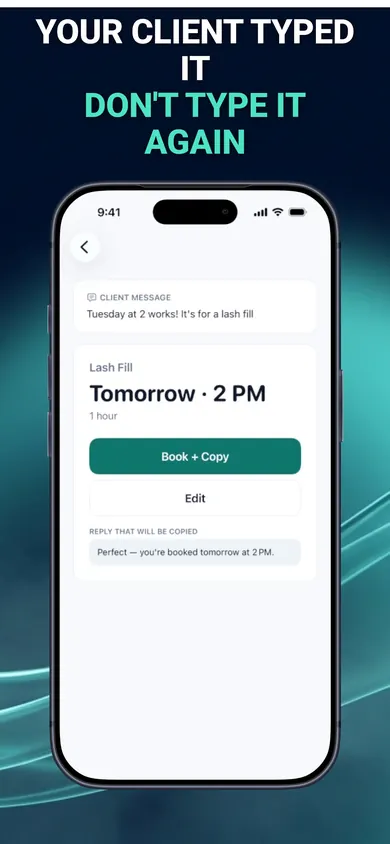
BookingSolved: Client Booking is an iPhone app for the step after this link, when "Could I book Tuesday at 2?" arrives:
- Paste or share a client's request and it finds the service, date, time and duration, flagging anything unclear instead of guessing
- It checks your Apple Calendar and prepares the appointment. Nothing changes until you approve it
- It suggests open times within your business hours, around existing appointments and buffers
- An editable confirmation is ready in a Friendly, Professional or Concise tone, and you send every reply yourself
Get BookingSolved on the App Store
Free to download for iPhone. Details taken from the app's App Store description, checked 10 November 2026.
Questions
Does this take the booking for me?
No. The link shows your open times and writes the client's request for them. The request arrives as an ordinary message and you confirm it yourself, so nothing lands in your calendar without you.
What if two clients pick the same time?
It can happen, because the link has no server behind it to mark a time as taken. Whoever messages first gets it, and you offer the other client a different time. Sending each client a slightly different set of times avoids most clashes.
Do my clients need to install anything?
No. The link opens in any phone or computer browser. They tap a time, add their name and send the message it writes.