Updated November 2026 · For seasonal retail, warehouse and delivery shifts through January

Know your hours.Review your first holiday paycheck.

A holiday temp job pay calculator: rate, weekly hours and the overtime rule that applies to you, then a simple gross-pay scenario to compare with your own records.

Download on the App StoreEarnCheck · Free first pay period, no account

Estimate the season

Gross pay only. Taxes and deductions depend on where you live and are not estimated here.

—

A simplified estimate that repeats one identical workweek. Enter paid hours for that workweek after any genuinely unpaid breaks. This tool has no workweek-start selector and does not split shifts. It uses the entered hourly rate for overtime; premiums and bonuses can affect the legally required regular rate, which it does not calculate. Check eligibility and exceptions before using a preset. Sources: U.S. Department of Labor, Ontario Employment Standards Act. Not legal advice.

What the check looks like

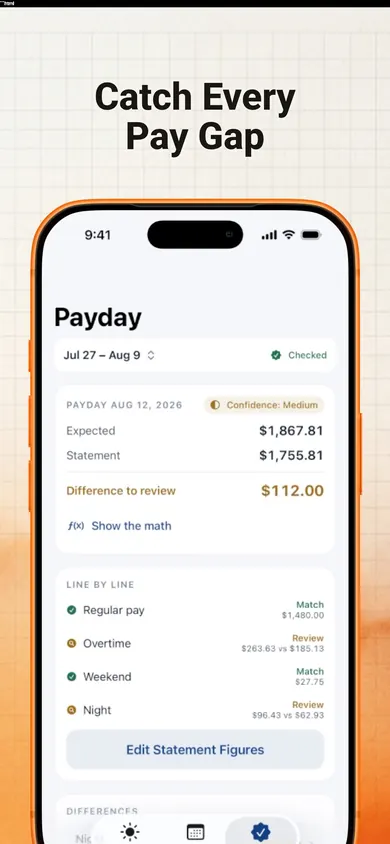
EarnCheck Payday screen comparing expected gross with the statement and showing a difference to review, line by line
Expected vs statement, line by line: Match or Difference to Review.
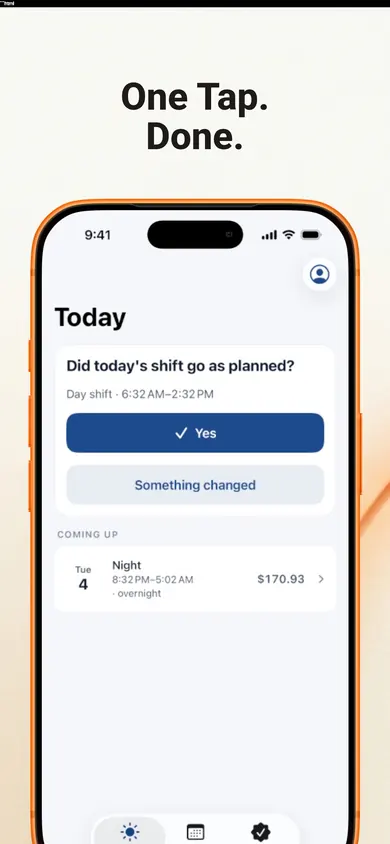
EarnCheck Today screen asking whether the shift went as planned with a one-tap Yes
One tap confirms a shift. Scheduled is not counted until confirmed.
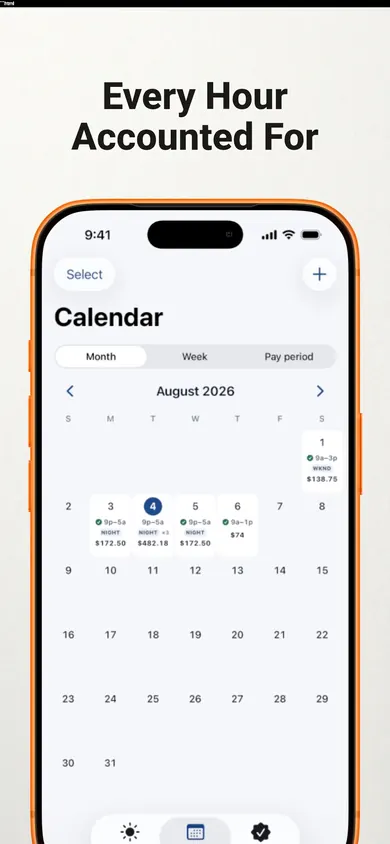
EarnCheck calendar showing confirmed shifts and estimated amounts by day
Hours and estimated amounts, by day.

A worked example you can check

Fictional arithmetic example, not a customer result or determination of pay owed.

At 17.50 per hour for 44 hours in one workweek, the simplified 40-hour preset gives 700.00 regular pay plus 105.00 overtime: 805.00 for the week. Eight identical weeks total 6,440.00, before deductions.

The 44-hour preset gives 770.00 for that same 44-hour week: 6,160.00 over eight identical weeks. These are different assumptions, not a choice of which amount an employer may pay. Eligibility, exceptions and local rules determine which calculation applies.

Before comparing an estimate with a statement, match the pay-period dates and the employer's defined workweek. Review shift times, break records, rates and premiums separately. EarnCheck can help organize those records; a difference remains something to investigate.

Who it is not for

  • Pay arrangements that need a different calculation, including salaries, multiple rates, piece rates or exemptions. This simple tool models one hourly rate; a salary alone does not establish an overtime exemption.
  • Anyone who wants net pay. Taxes and deductions are deliberately out of scope, in the app and on this page.
  • Tipped work where tips are most of the money. EarnCheck estimates gross from hours and rules; it does not track tips.
  • Anyone looking for legal advice. A difference is something to review. Your payroll team or local labour authority confirms what applies.

Honest limits

The calculator uses one hourly rate, a weekly threshold and the same hours in each week. It does not model daily overtime, double time, holiday-pay entitlements, regular-rate adjustments, averaging agreements or other exceptions. A contract cannot waive statutory overtime rights that apply under the U.S. FLSA or Ontario ESA; see the official sources above. Confirm the rules for your situation with payroll or the relevant labour authority. Honest Little Apps publishes this tool and EarnCheck.

Keep your shift record in EarnCheck

Put the pay stub in order

Arrange the calculation from hours to net pay. Actual pay-statement layouts vary. Drag, or use the arrows.

  1. Net pay
  2. Premiums
  3. Regular pay
  4. Hours worked
  5. Deductions
  6. Overtime pay
  7. Gross pay
  1. Hours worked Confirmed shifts, minus unpaid breaks. Everything starts here, which is why an independent record matters.
  2. Regular pay Hours up to the overtime threshold, times your rate.
  3. Overtime pay Hours over the threshold, times 1.5 under the U.S. federal rule or Ontario's 44-hour rule. Eligibility, exemptions and additional local rules can change this simplified calculation.
  4. Premiums Extra amounts entered for the scenario. Required holiday pay and the effect of premiums on the overtime regular rate need a separate check.
  5. Gross pay Regular plus overtime plus premiums. This is the number EarnCheck estimates and compares.
  6. Deductions Tax, pension and the rest. Kept separate on purpose: a deduction is not missing pay.
  7. Net pay What lands in the account. Last on the stub, first thing you look at, least useful for spotting an hours error.

Questions seasonal workers ask

How is overtime calculated for a seasonal job?

The U.S. federal preset uses 1.5 times the entered hourly rate after 40 hours in one workweek. The Ontario preset uses 1.5 times that rate after 44 hours. These are simplified models for eligible workers, not eligibility tests. Exemptions, regular-rate adjustments and additional local rules can change the result. This tool does not set or split workweeks.

Why does my first paycheck look short?

Possible reasons include pay-period cutoff dates, recorded hours or breaks, rates, premiums and deductions. Compare the same dates and compare gross pay with gross pay. EarnCheck organizes differences for review; a difference alone does not prove an error.

Do I get holiday pay as a temp?

Eligibility and amounts depend on the applicable law and employment circumstances. This calculator does not determine holiday-pay entitlement. Its premium inputs only add the amount you enter, and do not model any related overtime regular-rate adjustment.

Does EarnCheck connect to my employer or bank?

No. No account, no bank login, no employer login. You confirm shifts and type figures from your pay statement; records stay on the phone unless you export them. It never contacts your employer; it drafts a neutral message you can send yourself if a difference holds up.

Is it free?

The web calculator is free. EarnCheck's free tier covers one job and the first pay period; saved records stay viewable. Pro adds further pay periods, multiple jobs, advanced overtime and premium rules, plus exports and backup. See the App Store for current prices and trial eligibility. Requires iOS or iPadOS 18 or later.

Is a difference proof my employer underpaid me?

No, and the app says so too: a difference is something to review, not proof of an error. Start with the explanations to check first. Your payroll team or local labour authority can confirm what applies to you. This page is not legal advice.

Yours alone. Always private.

No account, no bank login, no employer login. Records stay on your phone.

Download on the App Store