Who should skip it
- A parent who will not carry a phone or iPad. Senior Mode needs a device within reach at dose time. A locked dispenser or a daily call may serve better.
- Families on Android. Each helper needs DoseBeacon on an iPhone or iPad, per the listing.
- Anyone expecting proof. A tap is a report. If you need verified dispensing, that is hardware and a pharmacy service, not an app.
- Dose questions. If the question is how much or when, that is the pharmacist or prescriber, not this page.
1. Are you the person who is physically there most days?
2. When a reminder goes unanswered, what do you want to do?
3. How many people will be in the circle?
Honest limits
The listing says it: not proof a medicine was taken. The app is honest about this everywhere; be honest about it with yourself.
$8.99 a month or $59.99 a year for unlimited medications, more caregivers and the Dose Handshake. Free covers 1 patient, 2 active medications and 1 helper. Three or more of you, or more than two medicines, means paying.
Reminders work offline; the shared record updates when phones are online. “Saved on this device. Sharing pending” is what you will see in a dead spot.
The pharmacy-label scan uses on-device text recognition to create a draft; the listing says to check every field before any reminder turns on. Do.
The screens, annotated
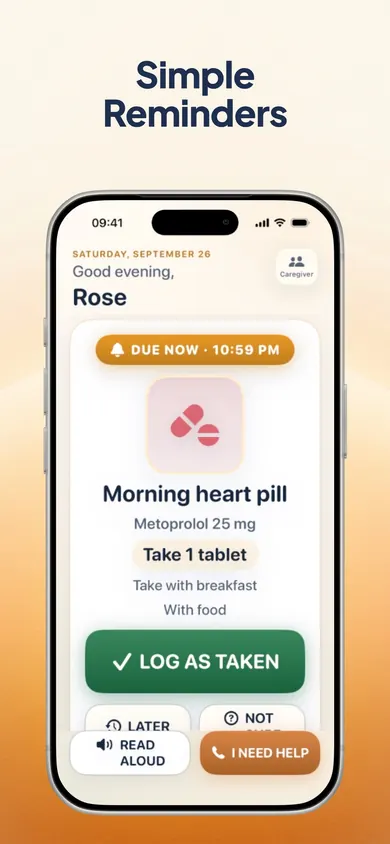
What your parent sees
- 1One card at a time, large and high-contrast. The medicine name, the dose and the instruction, nothing else.
- 2Four answers: Log as taken, Later, Not sure, I need help. Not sure is a real answer, and the quests reward it.
- 3Read aloud, Dynamic Type and VoiceOver. Senior Mode never shows ads or purchase screens, per the listing.
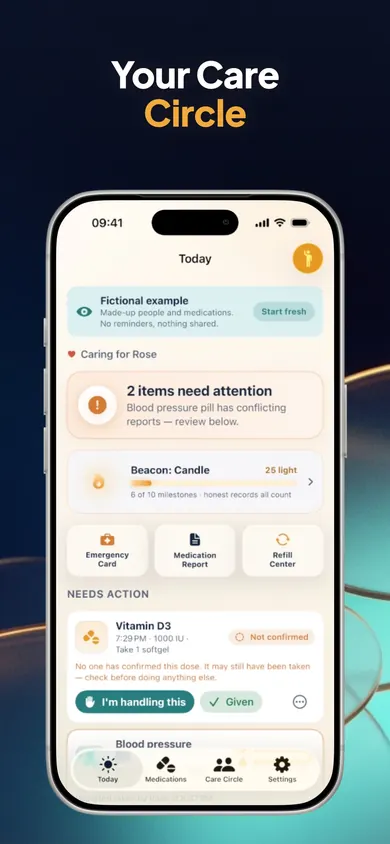
What you see, far away
- 1Needs action: a dose nobody has reported shows as Not confirmed yet. It does not say missed, because nobody knows yet.
- 2Conflicting reports are flagged for review rather than one silently winning.
- 3I'm handling this tells the others you are on it. It is never shown as a dose given.
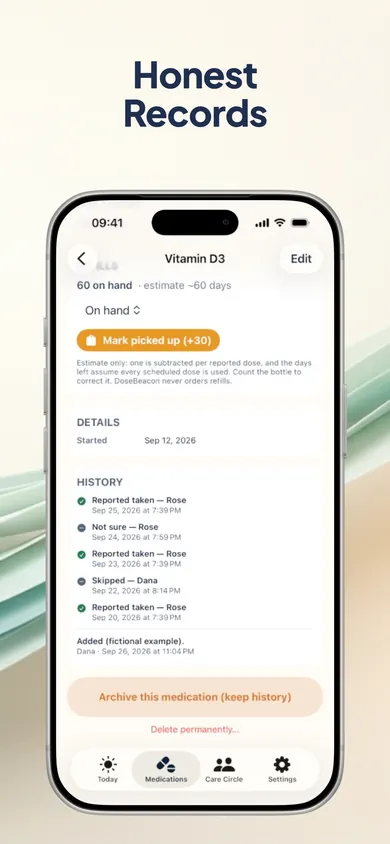
The record
- 1Every entry keeps who reported it, on which device and when. Corrections add to the history; nothing is silently erased.
- 2On-hand count and refill estimate, clearly labelled as an estimate.
- 3Archive keeps the history. The 7, 30 or 90-day PDF is what you bring to the doctor.
The first week, in three moves
Day 1: set up with them on the phone
Review the medicine list against the current instructions, check every scanned field, and explore Senior Mode together. Explain Log as taken, Later, Not sure and I need help without creating a practice dose record. Only record what is known; ask the pharmacist or prescriber about dose uncertainty.
Day 2: invite the circle
A circle code only sends a join request; you approve it and choose a role: manager, dose-logging helper or read-only family. Agree each person’s responsibilities with your parent, and choose the least access needed for that role.
Days 3 to 7: agree how to follow up
Agree a contact plan with your parent and approved helpers in advance. Not confirmed yet does not establish whether a dose was taken; check when the record last updated and follow the individual instructions from the pharmacist or prescriber. Review the emergency card and preview the report together. This guide sets no waiting period for an uncertain dose.
Turn the first week into a clear review brief
Record what worked in the setup, keep unknowns visible, and bring one focused question to the next conversation. The brief stays in this browser tab unless you choose to print or download it.
Keep it non-medical and non-identifying. Do not enter names, medication names, doses, schedules, diagnoses, access codes or contact details. This is a setup-review aid, not a medication list or dose record.
Nothing is saved or sent.
Your first-week review brief
This brief is generated only in this browser tab. It does not transfer into DoseBeacon, verify adherence, establish that a dose was taken, or replace a pharmacist or prescriber.
Questions from the far-away sibling
What is the best pill reminder app for elderly parents?
The one your parent will actually answer. For the person taking the medicine, that means one big card, large text, read-aloud, and an honest set of answers including Not sure and I need help. For the family, it means a shared record that says who reported what, and does not call a silence a missed dose. DoseBeacon's listing describes exactly that split: Senior Mode for the parent, a Care Circle for the helpers.
Does it work if my parent's phone has no internet?
Reminders are scheduled on the device and work offline, per the listing. Sharing to the Care Circle needs a connection; every screen shows when it last updated.
What does a logged dose actually mean?
A report. The listing says so in its own words: a logged dose is a report, not proof a medicine was taken. Every report keeps who made it, on which device and when; a dose nobody has reported shows as Not confirmed yet, never missed.
Can two of us log the same dose by mistake?
If two people report the same dose it is flagged Needs review rather than overwritten, and tapping I'm handling this is never shown as a dose given. That is the Dose Handshake, which is part of the Family subscription.
What is free, and what costs money?
Free: reminders, 1 patient, 2 active medications, 1 helper, full history, reports and the emergency card. DoseBeacon Family adds unlimited active medications, more caregivers and the Dose Handshake at $8.99 a month or $59.99 a year, with a 7-day trial for eligible new subscribers and a reminder before it ends. If you stop subscribing, records stay.
Is it a medical device?
No. The listing is explicit: a reminder and record-keeping app, not a medical device; it does not give medical advice or recommend doses. If you are unsure about a dose, ask a pharmacist or the prescriber.
Open DoseBeacon in the App Store
DoseBeacon: Pill Reminder. One big card for your parent; a shared, honest record for the people who help. Reminders work offline. Free to start, Family subscription optional.
Open on your iPhone
On another device? Scan with your iPhone Camera, then tap the link.

Open DoseBeacon: Pill Reminder on the App Store
The code opens the App Store. It does not transfer entries or results from this page.
Sources
- DoseBeacon: Pill Reminder on the App Store, listing and release notes read 4 November 2026 (version 1.1.0): Senior Mode, Care Circle roles, Dose Handshake, history behaviour, free tier and Family pricing, offline reminders, not-a-medical-device statement.
- US Food and Drug Administration, Create and Keep a Medication List for Your Health and As You Age: You and Your Medicines, checked 6 November 2026: keep the list current and ask a health care professional about medicine instructions.
Practice reading the record before sharing it
A reminder, a helper claim and a reported dose establish different things. Read six fictional medication records and compare what each one shows with what remains unknown. The untimed activity uses no patient details and makes no dosing decisions.
Useful for someone else?
Share the public guide. Your entries and results are not included.
Open the public guide link