What does the 7-day family emergency plan challenge cover?
Seven tasks, one a day: find your shutoffs, set contacts and meeting places, make an Emergency Card, gather documents, build a 72-hour kit from Ready.gov's list, sort out pets, dependants and a neighbour, then walk the plan and set a review date. Each task has a "done when" line so you know when to stop.
Download the printable 7-day tracker (PDF, one page)Find the shutoffs
Walk the house with your phone's flashlight: water main, gas valve, electrical panel. Photograph each and note the tool you need (many gas valves need a wrench). New-home day one, because nobody else knows where they are either.
Done when: Water main, gas valve, breaker panel located and photographedContacts and two meeting places
Pick an out-of-area contact everyone texts if local lines are jammed, one meeting place outside the home (the mailbox, a neighbour's drive) and one outside the neighbourhood (a school, a library). Write the addresses, not just the names.
Done when: Out-of-area contact + two meeting places written downEmergency Card
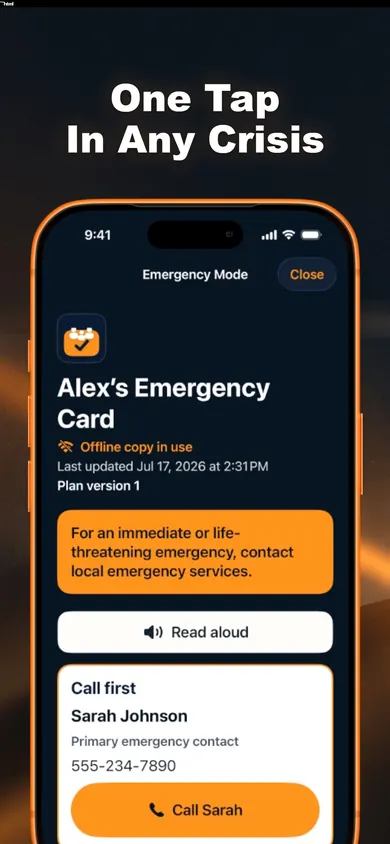
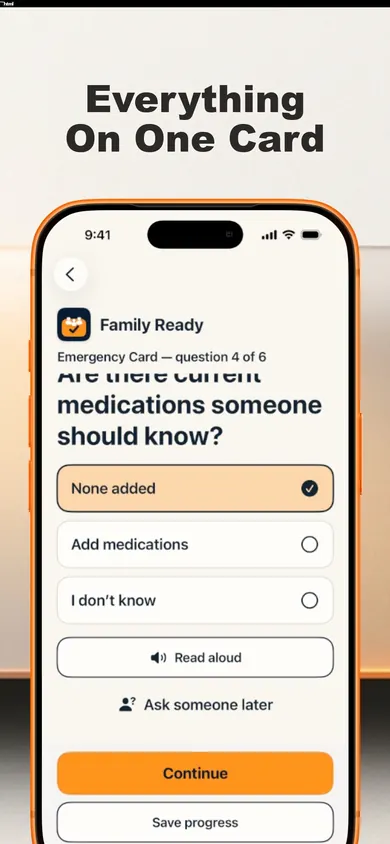
Who to call first, allergies, current medications, important conditions. In Family Ready the card is free, saved on the iPhone, and opens in Emergency Mode without internet once the phone is unlocked. Make one per person, with permission.
Done when: An Emergency Card for each person in the houseDocuments in one place
Insurance policy numbers, ID copies, deeds or lease, vet records, a recent photo of each person and pet. Paper copies in a sealed bag; digital copies in an encrypted backup you can restore elsewhere.
Done when: Document list made; copies stored in two placesThe 72-hour kit
Ready.gov's baseline: one gallon of water per person per day for several days, a several-day supply of non-perishable food, flashlight, first-aid kit, extra batteries, a whistle, medications, phone chargers. Tick what you own; buy only the gaps.
Done when: Kit checklist ticked; gaps on a shopping listPets, dependants, neighbours
Carrier, leash and food for each pet; care instructions for anyone who depends on you; one neighbour who has a key and your number. Knock on the door today. It is the whole reason you moved to a street.
Done when: Pet and dependant notes done; one neighbour knows youWalk it, then set the review
Do a ten-minute drill: everyone finds the shutoffs and names the meeting place. Then pick a review schedule, 3, 6 or 12 months, and put the date on the fridge and in the app.
Done when: Drill done; review date set
Can you pass along the same message?
Practice a family check-in at the table, with no phone call or text. One person reads a fictional update aloud. The other listens for the place and the time of the next update. Playing alone? Read it once, hide it and try the same questions.
Practice card 1 of 3
Practice only: We’re at the library entrance. We’ll check in again at 3:30 p.m.
Compare your check-in
These are fictional details for a rehearsal, not destinations or instructions for an emergency. The exercise asks for no names, numbers or addresses and sends or stores nothing.
The National Weather Service’s family communications guide recommends practicing your plan and links to Ready.gov’s contact-card and map resources. This separate exercise from Honest Little Apps practices listening and clarifying. See Family Ready on the App Store ↗
Who gets the message? A family communication tabletop
Practise changing a contact plan when a phone, channel or usual contact is unavailable. This original two-page exercise uses fictional details and leaves you with one practical update.
Download the two-page communication exercise (PDF)
The PDF has selectable text and clickable references. Use the complete HTML version below if that format works better for you. The PDF is not tagged for assistive technology.
Read the complete exercise and facilitator notes
Fictional tabletop: optional 10-minute practice
Alex and Sam are safely in different places. Robin is their agreed out-of-town contact. No one is in danger. Work out how a short check-in reaches everyone when one part of the plan is unavailable.
Discuss only. Do not call emergency services, send test alerts or share real contact details. Anyone can pass. An adult facilitates household practice; use local official instructions in a real emergency.
- Choose who reads Alex, Sam and Robin. One person can cover more than one role.
- Read one card. Say the next contact attempt, what the message needs, and how you will know it arrived.
- Turn over one more card. Change the plan if needed. Finish with one practical update.
Four scenario cards
- A: Calls do not connect
- Alex can send a text, but voice calls do not connect. What brief check-in could Alex send to the agreed contact? What would count as a reply?
- B: One phone is flat
- Sam cannot use a phone. Which paper copy or agreed helper could Sam use? Where would Sam find the information without relying on that phone?
- C: The usual contact is unavailable
- Robin does not answer. What backup contact or next step was agreed beforehand? How would Alex and Sam learn the same update?
- D: Two copies disagree
- A printed contact card is older than the household plan. Who checks the details, dates the revision and replaces the copies that need updating?
Make one useful change
There is no winning score and no guaranteed delivery method. The useful result is a shared next step, a way to confirm a message arrived, and a current copy people can find.
- First attempt: agreed contact role and preferred channel.
- If unavailable: backup contact or next agreed step.
- Paper or offline copy: where a current copy can be found without this phone.
- Close the loop: what reply confirms receipt, and who passes on the update.
Write down one next change, who will check it and a review date. Keep actual personal details in your own household plan, not in a public exercise.
Facilitator notes
A: Keep the message brief; a sent message is not a confirmed reply. B: Find a usable paper copy or agreed support person. C: Agree the backup in advance rather than assuming everyone knows it. D: Check details with the people concerned and date replacement copies. These are discussion prompts, not emergency procedures.
Planning basis: Public Safety Canada, Make an emergency plan, steps 2 and 7, on meeting places, household contacts and an out-of-town contact. Checked November 5, 2026. This independent exercise is not a government publication.
Honest Little Apps created this exercise. Free to print and share intact with credit. It works without an app. Optional continuation: Family Ready on iPhone has a free Emergency Card, household plan and Snapshot PDF; optional Plus adds sharing and extra packs. This paper exercise does not sync to the app.
What three of the days look like in the app
Who should do this differently
Households in wildfire or hurricane zones
Do Day 5 first and size the kit for evacuation, not shelter-in-place: go-bags, fuel, and the route. Your county emergency office publishes zone maps; use those over anything generic here.
If you care for someone with complex medical needs
The Emergency Card holds medications and conditions, but a clinician-written care summary belongs in the documents pile too. The app organizes what you enter; it does not give medical advice.
If you want a shared family vault
Trusted-person invitations, household sync and guided reviews sit in Family Ready Plus, a subscription. The free tier is a single-iPhone plan with printable snapshots, which is enough for this challenge.
A made-up week, in a real kind of house
Boxes still in the hall, the previous owner's note on the fridge: "water shutoff is behind the furnace, gas is outside by the meter, you'll need the wrench." Day 1 took eleven minutes and two photographs. Day 2 was an argument about whether the meeting place could be the coffee shop (it can, if it is open at 3 am; it isn't, so it is the library). Day 3 the kids made their own cards and put "I don't know" for medications, which is correct. By Day 7 the drill ran in nine minutes and the review date went on the fridge next to the old note.
Questions before day one
How long does the 7-day family emergency plan challenge take?
About 20 minutes a day for seven days. Day 5, the kit, can take longer if you shop for gaps; Day 1 is the fastest in a house you already know and the slowest in a house you just moved into.
Do I need the app to do the challenge?
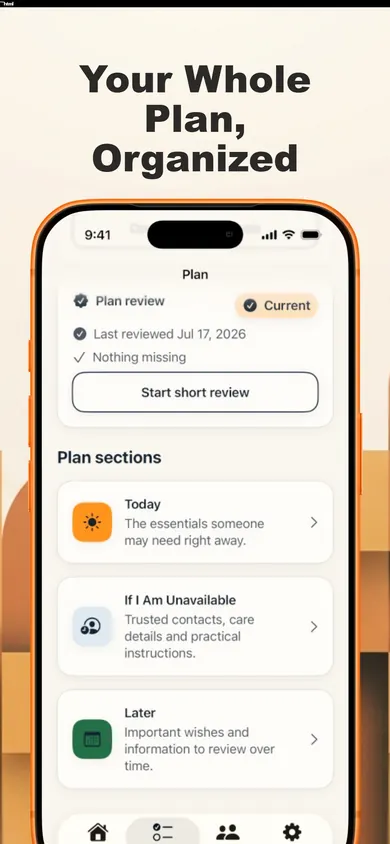
No. The printable tracker and this page are enough. The app adds the part paper cannot do: an Emergency Card that opens offline in a high-contrast Emergency Mode, a plan you can edit over time, a kit checklist based on Ready.gov and Get Prepared (Canada), and an encrypted backup you can restore on another device.
What goes on an Emergency Card?
Who to call first, allergies, current medications and important health information. Family Ready's card is free, stored on the iPhone, and never needs a subscription. You can make one for a child, a parent or someone you care for, with their permission.
How much water should a family store?
Ready.gov's kit guidance is one gallon per person per day for several days, for drinking and sanitation. A household of four storing three days needs twelve gallons; the Day 5 task is to count what you have and buy only the gap.
Is Family Ready free?
The free tier includes the Emergency Card, Emergency Mode, offline access, the household plan, the kit checklist, encrypted backup and restore, and an Emergency Snapshot PDF. A Plus subscription adds trusted-person invitations, household sync, guided reviews, date reminders and extra printable packs. The listing says your information stays available if a subscription ends.
Does the app call emergency services for me?
No. Emergency Mode shows your contacts and a prominent reminder to contact local emergency services for anything life-threatening; you tap to call. The app never calls or messages anyone automatically.
Download free on the App Store
Family Ready: a free offline Emergency Card, a plan you finish at your own pace, and a kit checklist built on Ready.gov and Get Prepared (Canada). No account to start.
Open on your iPhone
On another device? Scan with your iPhone Camera, then tap the link.

Open Family Ready: Emergency Plan on the App Store
The code opens the App Store. It does not transfer entries or results from this page.
Sources
- Ready.gov, Build a Kit (one gallon of water per person per day for several days; several-day food supply), read 4 November 2026.
- Ready.gov, Make a Plan (out-of-area contact, meeting places), read 4 November 2026.
- Government of Canada, Get Prepared: basic emergency kit (72 hours), read 4 November 2026.
- Family Ready: Emergency Plan, App Store listing, version 1.2.0, read 4 November 2026. Feature statements and free/Plus split come from this text.
Useful for someone else?
Share the public guide. Your entries and results are not included.
Open the public guide link