THE FOLLOW-UP IS PART OF THE PLAN
Done today. Look again later.
A completed task can disappear from the list—and from memory. Give one home task a few deliberate follow-up dates, then put them where you will see them.
Try the free tool ↓A scheduling aid for your own notes. It does not inspect repairs, certify safety or set maintenance requirements.
THE INTERACTIVE WORKSPACE
Turn one completed task into a follow-up plan.
Creates separate all-day events, not a subscription or calendar sync. Import the file yourself and check the dates. No alerts are included; configure notifications in your calendar if wanted. Importing again may duplicate events. A shared or cloud calendar may expose the label and dates to that service or its members.
TAKE THE FOLLOW-UP OFF SCREEN
Keep the dates beside what you observed.
A calendar says when to look. This one-page change log records whether the check happened, what you actually saw and who will take the next step. Use it for one home task across three visits.
Download the free follow-up change log (PDF)
One Letter-size page. For A4, use fit-to-page. Blank handwriting fields; no email or app is required. Keep completed sheets appropriately. The app link and QR code are optional.
What is on the sheet
- Context: task, room, reported completed date, person to follow up and an earlier note or photo to compare with.
- Three follow-ups: separate planned and checked-on dates, plus a choice of “Not checked” or “Observation recorded.”
- Your record: what you actually observed, then the next action, who will do it and by when.
Try one honest entry
Task: entryway storage review. Planned: December 4. Checked on: December 5. Observation: “Two boxes are back in the walking route.” Next action: “Task owner: agree a storage place, then review on December 12.” These are fictional notes to show the format, not a recommendation about the condition or interval.
- Copy up to three planned dates from your preview above, or choose dates using the actual task instructions or qualified guidance.
- When you look again, enter the date the check actually happened. If it did not happen, mark “Not checked” rather than leaving an apparent all-clear.
- Describe what changed, what stayed the same or what could not be checked. A photograph records visible appearance; it does not verify hidden work.
- Write a concrete next action with its owner and date. Keep the earlier reference with the log so the next person can compare the same information.
Accessible text equivalent: the complete fields and directions are above. The PDF is an untagged print worksheet. Both are separate companions from Honest Little Apps, publisher of RoomMend; they do not inspect work, establish maintenance requirements or certify safety.
USE IT IN REAL LIFE
Make “look again” concrete.
- Record what was reported completed. A checked box is a report, not independent proof that work is correct.
- Choose a follow-up date for this task. This calculator adds calendar days. Thirty days after January 31 is not necessarily the last day of February.
- Keep the earlier observation handy. When you revisit the task, compare your notes and record what you actually see. If you cannot tell, write “not checked” rather than “fine.”
- Keep dates and evidence together. A calendar event tells you when to look. RoomMend can keep the room, task, notes and before/after photos in one place.
This is an organizational resource. Electrical, gas, structural, fire-safety and mobility concerns call for qualified help; this schedule is not a substitute for it.
What the download contains
The file contains one all-day event per previewed date, your task label and a generic review note. It contains no reminder alarm, location, invitation or attendee. Nothing is sent by this page. The first recheck is one selected interval after the reported completed date.
Calendar format reference: iCalendar specification (RFC 5545). Calendar-client display and notification settings can vary.

THE NEXT STEP
Keep the fix, photo and recheck in one place.
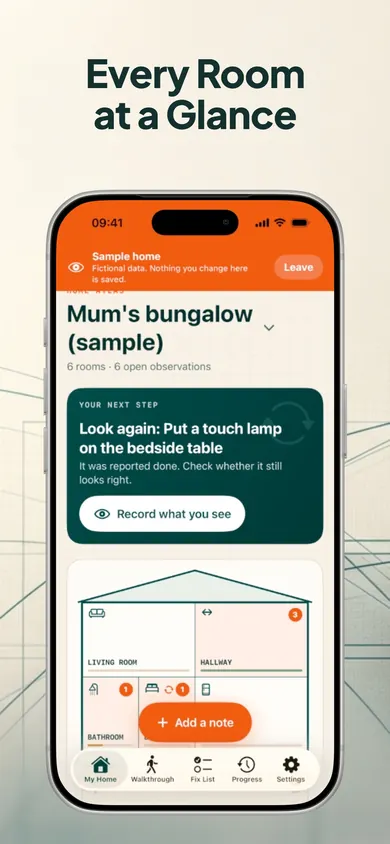
RoomMend organizes room-by-room notes, fix status, before-and-after photos and rechecks. Its current listing describes a follow-up reminder after a task is marked done, plus a home screen that shows a next step. Move beyond a calendar label when you want the context beside it.
Get RoomMend’s free fix and recheck tools ↗Free includes walkthroughs, rooms and notes, fix lists, reminders, rechecks and room PDFs. RoomMend Plus is an optional one-time purchase for additional homes, photo capacity and export features; no subscription. iOS/iPadOS 18+. This calendar file does not sync with RoomMend.
Publisher disclosure: Honest Little Apps publishes RoomMend and this companion. This is not an independent review. App details checked November 4, 2026.
Useful for someone else?
Share the public guide. Your entries and results are not included.
Open the public guide link