A composite scenario built from conversations with solo cleaners. Not a customer story.
Dana has cleaned houses on her own for six years. December is a third of her year's income and the month she likes least, not because of the work but because of the phone. By the time she has parked at the Harpers' on Monday she has three requests: Karen wants a guest-ready clean "any day except Wednesday", Priya wants the pre-party deep clean "same as last year", and Mike's lake-house rental needs a turnover between an 11 am checkout and a 4 pm check-in on Thursday.
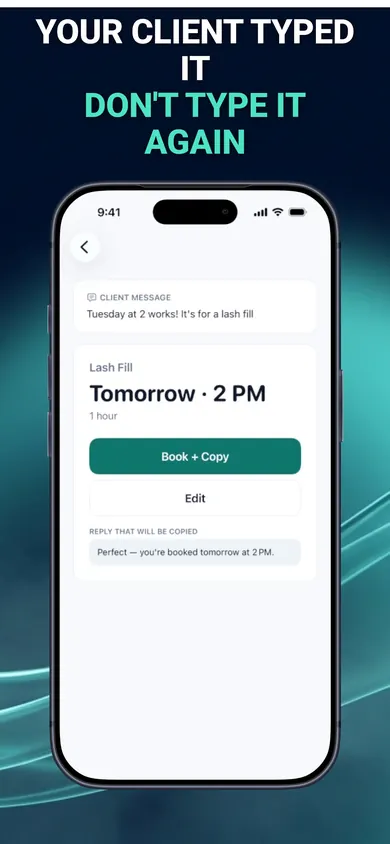
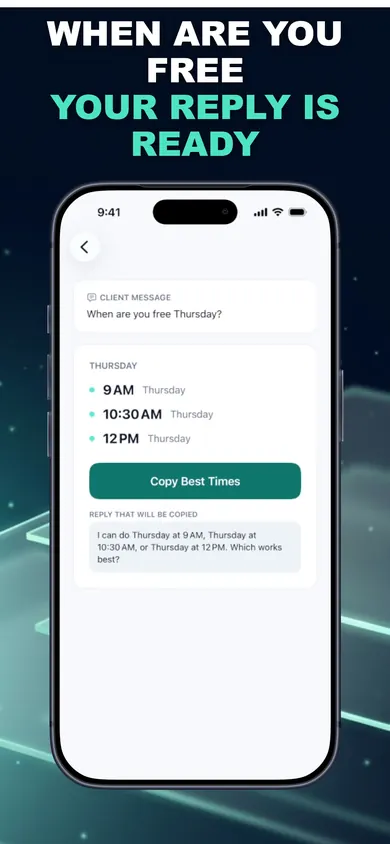
Last year she would have replied "yes!" to all three and sorted it out later. Later was the problem. This year she does the one thing differently: she pastes Karen's message into BookingSolved, it reads the request, sees "any day except Wednesday" is not a time, and flags it instead of guessing. It offers her three open slots inside her business hours, around the Harpers and the Okafors, with her usual 30-minute travel buffer. She copies the reply: "I can do Thursday 9 to 12, or Tuesday afternoon. Which works?" Karen takes Thursday morning. The appointment is in Calendar before Dana gets out of the car.
Tuesday, 6:58 pm: the one that always bites
Priya: "Actually can we move it an hour later? Kids are off school." Dana is elbow-deep in Linda's oven. This is the message that produced last year's double booking, because "an hour later" got remembered as "Friday afternoon" and Friday afternoon was already Tom and Ali.
This time she pastes it in. The app finds Priya's existing appointment, shows the before-and-after preview, and moves it only when she taps approve. It also shows her that Friday is now Mike's lake house, since his checkout moved, so Priya's deep clean lands on Monday afternoon instead, where there is actually room. The reply is ready in a professional tone; she softens it to friendly and sends it herself.
Thursday night Karen texts "Still ok for tomorrow?? (you never confirmed)". Dana scrolls up. She did confirm, on Monday, with a time. The difference between this December and last is not that Dana got more organised. It is that every yes went into the calendar at the moment it was said.
The real screens
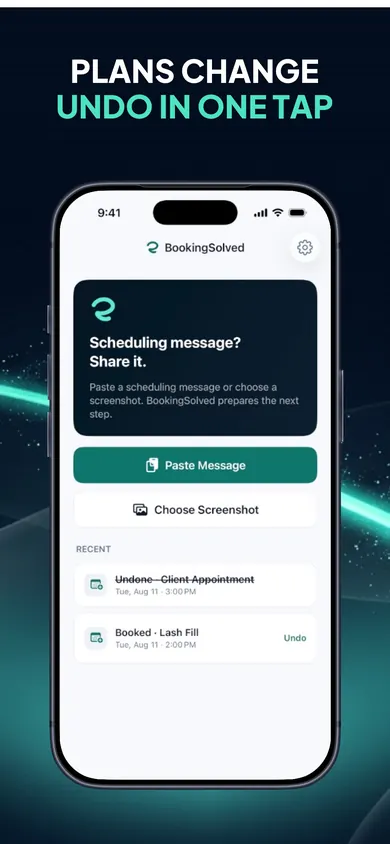
From the App Store listing. What the moment above looks like on an iPhone.
Questions cleaners ask
When does the holiday cleaning rush actually start?
For home cleaners it builds from the week before Thanksgiving and peaks in the ten days before Christmas, when guest-ready cleans, party prep and rental turnovers all land at once. Protectivity, a UK trade insurer, suggests promoting your Christmas availability four to six weeks ahead and keeping a few slots open each week for short-notice work. That is roughly now, if you are reading this in November.
How do I stop double-booking during the rush?
Have one place that is the truth. For most solo cleaners that is already the calendar on their phone. The failure is the gap between a text that says "Thursday afternoon?" and the moment it gets written down. Close that gap on the spot: check the calendar while the message is open, reply with a time you have confirmed, and put the appointment in before you put the phone down.
Should I use a booking portal for my cleaning business?
If your clients are happy to book themselves and you want them to, a portal can work. Most of the cleaners we talked with found their clients kept texting anyway, so the portal became one more thing to check. BookingSolved takes the other route: clients keep texting, you keep Apple Calendar, and the app sits between the two. It never contacts clients and never reads messages you did not hand it.
Does BookingSolved send the confirmation for me?
No. It writes an editable reply in a friendly, professional or concise tone, and you send it yourself from whatever app the client used. Nothing goes to a client without you tapping send.
What happens when a client changes the time, like Priya did?
"Can we move it an hour later?" finds the existing appointment, shows a before-and-after preview, and moves it only when you approve. Undo checks that nothing changed in Calendar before reversing. The listing describes exactly this, and it is the part of the rush that bites hardest.
Is it free?
BookingSolved is free to download. We describe only what the App Store listing and screenshots show; if there are paid options inside the app, the listing is the place to check before you rely on anything here.
How it works, in three steps
- Add the request. Paste the text, pick a screenshot, or use the Share Sheet. Only what you choose is read; the app never watches your messages in the background.
- Review what it found. Service, date, time and duration are worked out on the phone. Anything vague, like "next Friday" or "any day except Wednesday", is flagged, not guessed.
- Approve and reply. It checks Apple Calendar, prepares the booking, reschedule or cancellation, and writes an editable reply. You approve, you send. Nothing changes in Calendar until you say so.
Who it is not for
- Teams with a dispatcher and a shared schedule. This is a one-person tool built around one person's calendar.
- Anyone who wants clients to self-book from a public link. There is no portal, by design.
- Google Calendar or Outlook households. Apple Calendar is the source of truth, and that is the only calendar it talks to.
- Businesses that need deposits or card holds at booking. No prices are stored, and no money moves.
Honest limits
BookingSolved will not fix a rush you have already overbooked, and it cannot tell you what to charge for a same-day after-party clean. Protectivity's guide to the Christmas cleaning rush covers that side: promote availability four to six weeks out, keep a couple of slots open each week for urgent work, and charge a premium for it. Speed Cleaning's Thanksgiving rush notes are a fair companion for the earlier peak. What the app does is narrower: it closes the gap between a text and a calendar entry, which is where most December double-bookings are born. If your calendar lives on your iPhone, that gap is worth closing before the fifteenth.