The Ignore Limit bill

How often do you tap past a limit, and for how long? Nothing is sent anywhere.

—hours a week past the limit
—days a year, at that rate
—hours a week back if you Go Back at the rate you said, and the other opens become timed Passes that end on their own

Arithmetic, not a promise. The hours-back estimate assumes each skipped visit would have lasted the number of minutes you entered and other visits would take the same time as before. In FocusPass, you choose a duration; the selected app relocks when that Pass ends.

Method vs method · updated November 2026

What to do when Ignore Limit wins again.

If you keep tapping past your own iPhone Screen Time limits, compare what each method asks you to do at the moment you want an app. Settings and device management affect the controls. This guide includes FocusPass, made by Honest Little Apps.

Download FocusPass: App Blocker on the App StoreOpen FocusPass in the App Store · free tier

See a ten-minute Pass in 24 seconds

Four methods, one question each

The question is always the same: what happens at the moment you want the app? Swipe sideways.

Screen Time App Limits

At the moment you want the app
A limit screen with an ignore option, or a passcode prompt if one is set
Who holds the key
Depends on passcode, recovery and device management settings
Cost
Free, built in
Best for
Awareness; a partner-held passcode

Deleting the app

At the moment you want the app
Reinstall the app; you may also need to sign in again
Who holds the key
You
Cost
Free
Best for
Apps you are actually done with

A Focus mode

At the moment you want the app
Nothing; Focus silences notifications, it does not block opening
Who holds the key
Nobody; there is no lock
Cost
Free, built in
Best for
Stopping the pull, not the push

FocusPass (ours)

At the moment you want the app
A shield offers Go Back or Use a Pass. Choose a duration; a reason is optional. iOS schedules the relock.
Who holds the key
You; Turn Off All Protection always works
Cost
Free tier; Pro subscription optional
Best for
Keeping the app, losing the autopilot

FocusPass · screenshot walkthrough

What happens when a timed Pass ends?

The selected app becomes protected again when its Pass expires. Here is how a ten-minute reply differs from tapping Ignore Limit. The walkthrough uses three real App Store screenshots; it does not operate your phone.

24 seconds · silent, with on-screen text. Made by Honest Little Apps from its iPhone listing images. Open video file.
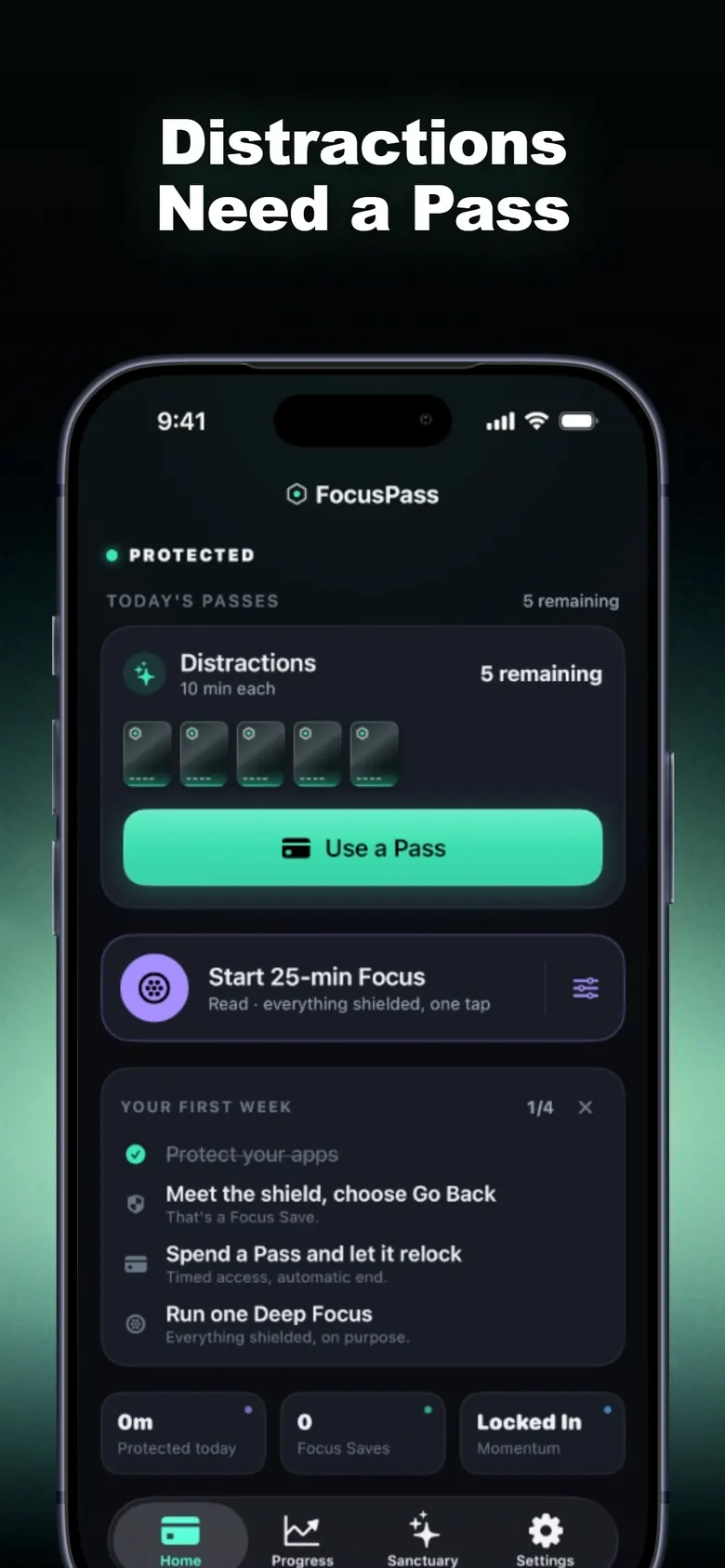
  1. At the icon, you have a choice.

    The Home screen shows your available Passes. When you open an app you’ve protected, its shield offers Go Back or Use a Pass. Go Back records a Focus Save, not minutes saved.

    View the full Home screenshot
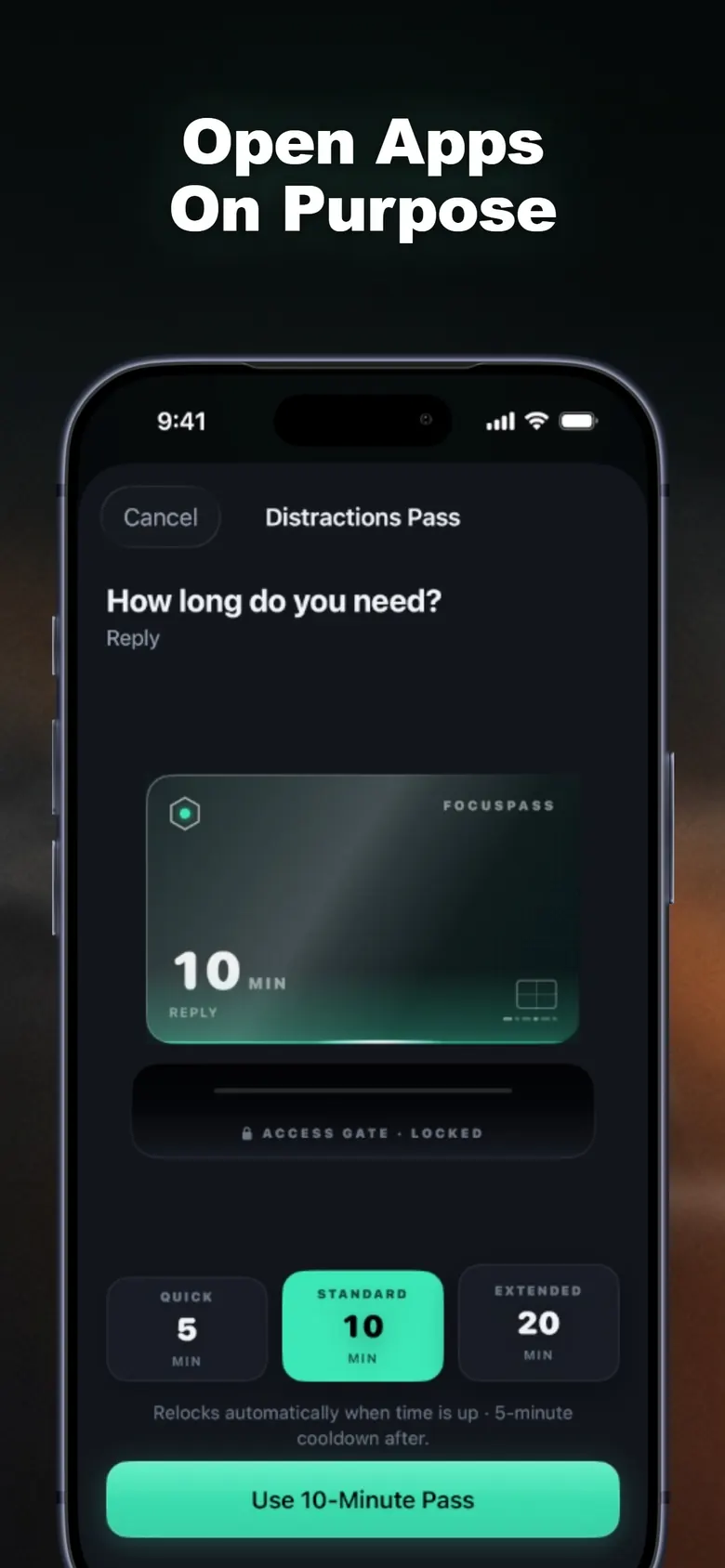
  2. Pick enough time for the reply.

    The official Pass screen shows 5, 10 and 20 minutes, with 10 selected. “Reply” is an example reason. You can leave the reason out.

    View the full Pass screenshot
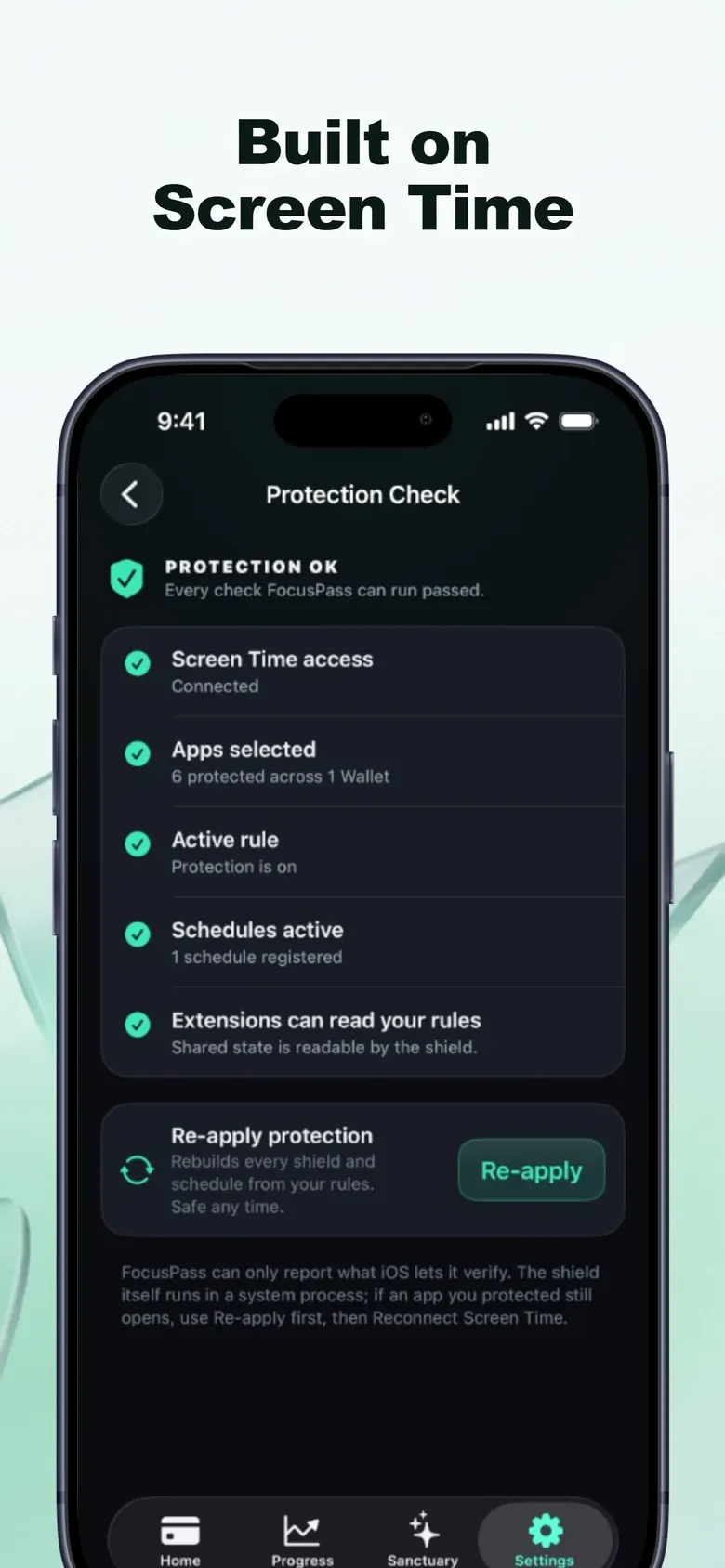
  3. At ten minutes, protection returns.

    iOS schedules the relock before access starts, even if you close FocusPass. The last image is Protection Check: it shows whether setup is working. It is not a recording of the moment the Pass expires.

    View the full Protection Check screenshot

Included free: shields for selected apps, timed Passes and automatic relocking. Pro adds more Wallets and Focus Zones, among other options. You can turn off protection on either tier.

Tuesday, 9:47 pm, made up but familiar

9:47 pmThumb on the icon before the thought arrives. The shield comes up: PROTECTED. You chose to protect this app. Two buttons.

9:47 pm, stillGo Back. One Focus Save. The app records the choice and nothing else; it does not guess what you did next, which was make tea.

10:20 pmYou actually need it: a reply to a friend. Use a Pass, 5 minutes, reason: Reply. The relock is already scheduled before the app opens.

10:25 pmLocked again, on its own. You did not have to decide to stop, which was always the hard part.

SundayWeekly Review: most of your Passes happen after 9 pm. The app offers an Evening Zone. You accept. That is the whole method.

Honest limits

It is a subscription for the full set.

Free is useful forever, per the listing: shields, Passes, relocking, one Wallet, one Zone, one Deep Focus a day. More of each is Pro, monthly or yearly.

You can switch it off.

The listing says Turn Off All Protection stays available without a purchase. A passcode held by someone else can add friction, but account recovery and device management affect what can be changed. Neither arrangement here promises an unremovable lock.

No screen-time claims.

Focus Saves count a choice, not minutes saved. Honest Little Apps has no study showing FocusPass reduces your usage, and the listing invents no minutes.

Apple's rules first.

Built on Screen Time frameworks; blocking happens on the iPhone (the Watch app shows status). If a parent or organisation manages Screen Time, their settings win.

Four things people believe. Tap to flip.

Who should skip it

  • People who need enforced device management. Check the applicable parental or organisation controls and recovery settings. FocusPass keeps its off switch available; this guide does not certify any arrangement as impossible to change.
  • Anyone whose Screen Time is managed by a parent or employer. Their settings come first, per the listing.
  • People who want a blocker for Mac or Android. iPhone and iPad, iOS 18 or newer; the Watch shows status only.
  • Anyone expecting a usage-reduction promise. There is none here. It changes the moment of opening; what you do with that is yours.

Questions

Why don't iPhone Screen Time limits work for me?

It depends on the settings and who manages them. Check whether a passcode protects changes and whether a parent or organisation manages the device. Apple documents passcode changes and recovery, so a passcode held by someone else is not a guarantee that the device owner can never change the controls.

What does a Pass actually do?

Per the listing: opening a protected app shows a native shield with two choices, Go Back or Use a Pass. A Pass is a length you pick (the walkthrough shows 5, 10 or 20 minutes) with an optional reason, and the relock is scheduled with iOS before the app opens, so protection resumes when the Pass ends even if FocusPass is closed.

Can I cheat it?

The listing says Turn Off All Protection remains available without a purchase. FocusPass supports deliberate, timed access; it does not promise tamper-proof controls or guarantee that settings and permissions can never change. Parent or organisation restrictions still take priority.

Does it work with Apple's Screen Time or against it?

With it. FocusPass uses Apple's Screen Time frameworks and picker; Apple keeps your app selections opaque even to FocusPass. If a parent or organisation manages Screen Time, their settings come first.

What is free?

Native shields, Go Back and Focus Saves, timed Passes, automatic relocking, one Wallet, one Focus Zone, one Deep Focus session a day, 7-day insights, Momentum and missions. Pro is a monthly or yearly subscription for more Wallets, Zones, Free Windows, Task Access, Adaptive Resistance, unlimited Deep Focus and full history.

Is there an account or tracking?

No account, no ads, no analytics SDKs, per the listing; rules and history stay on the device. Purchases are validated through Apple and RevenueCat with an anonymous ID.

Open FocusPass in the App Store

FocusPass: App Blocker. Block the apps you choose; open them on purpose with a timed Pass that relocks by itself. No account, no ads. Free tier, Pro optional.

Download FocusPass: App Blocker on the App StoreBuilt on Apple’s Screen Time
Open on your iPhone

On another device? Scan with your iPhone Camera, then tap the link.

QR code for FocusPass: App Blocker on the App Store

Open FocusPass: App Blocker on the App Store

The code opens the App Store. It does not transfer entries or results from this page.

Sources

  1. Apple Support, Change your Screen Time passcode on an iPhone or iPad, checked 6 November 2026. Apple describes passcode changes, recovery and Family Sharing management; the available steps depend on the software version and account setup.
  2. FocusPass: App Blocker on the App Store, listing rechecked 6 November 2026 (version 2.2): shield choices, Pass lengths, iOS-scheduled relock, Focus Saves, free tier and Pro, Turn Off All Protection, privacy.

The calculator above is arithmetic on numbers you typed. It makes no claim about what any method will do for you.

Useful for someone else?

Share the public guide. Your entries and results are not included.

Open the public guide link