Honest Little AppsGet Time Debt

A FAIRER SCREEN-TIME COMPARISON

Three days should not compete with seven.

A smaller weekly total can simply mean fewer days have happened. Compare the same recorded weekdays before deciding what changed.

Compare my two weeks

Enter minutes manually for one device and the same app or category scope. No access to your Screen Time data.

Match weekday to weekday

Use completed days from two separate weeks. Enter 0 for a recorded zero; leave missing or unfinished days blank. Use whole minutes, not hours.

DayWeek AWeek B
Monday
Tuesday
Wednesday
Thursday
Friday
Saturday
Sunday

How to compare screen time from two weeks

Keep the device, apps and reporting scope consistent. Then pair Monday with Monday, Tuesday with Tuesday and so on. A day counts only when both weeks have a recorded value.

The example, worked through

Week A has seven days at 300 minutes: 2,100 minutes total. Week B has three recorded days at 240 minutes: 720 minutes so far. Comparing those raw totals exaggerates the difference. On the three matching days, the totals are 900 and 720 minutes, a 20% decrease. The matched daily averages are 300 and 240 minutes.

Why blanks and zeros are different

A blank means there is no complete entry. A zero is a real value and stays in the calculation. Missing pairs are excluded, not estimated. If Week A has zero minutes in all matched pairs, a percentage change cannot be computed; the minute difference still can.

Try it with a class

Which days count? A printable screen-time worksheet gives learners two fictional logs to compare, with a separate answer key. It takes about ten minutes and requires no personal screen-time records.

Turn the observation into one decision

Choose an allowance that fits your actual needs. Keep work, navigation and intentional use in context. A lower number is not automatically a better day, and this comparison is not a health assessment.

Time Debt app icon

YOUR NEXT STEP

Make extra minutes a conscious choice.

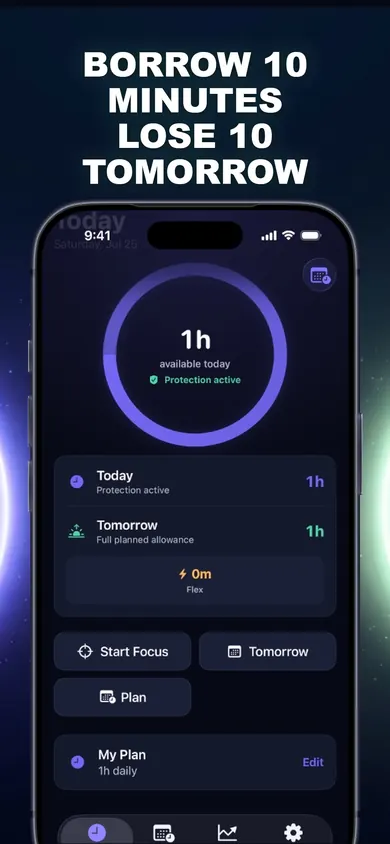
Time Debt lets you set an allowance for selected apps, then see what borrowing extra time does to tomorrow before confirming. Its core plan includes blocking, borrowing, automatic repayment and a seven-day history.

Get Time Debt and set your first plan

The core plan includes one full plan and emergency access. Optional Pro adds multiple plans, custom schedules, longer history and reports through paid auto-renewing subscriptions. Prices and trial eligibility appear before purchase. Requires iOS 18 or later. This browser comparison does not read or change device settings.

Publisher disclosure: Honest Little Apps publishes Time Debt and this companion. This is not an independent review. App details checked November 4, 2026.

Official Time Debt App Store preview
Official app preview. The browser tool is a separate companion.

Useful for someone else?

Share the public guide. Your entries and results are not included.

Open the public guide link